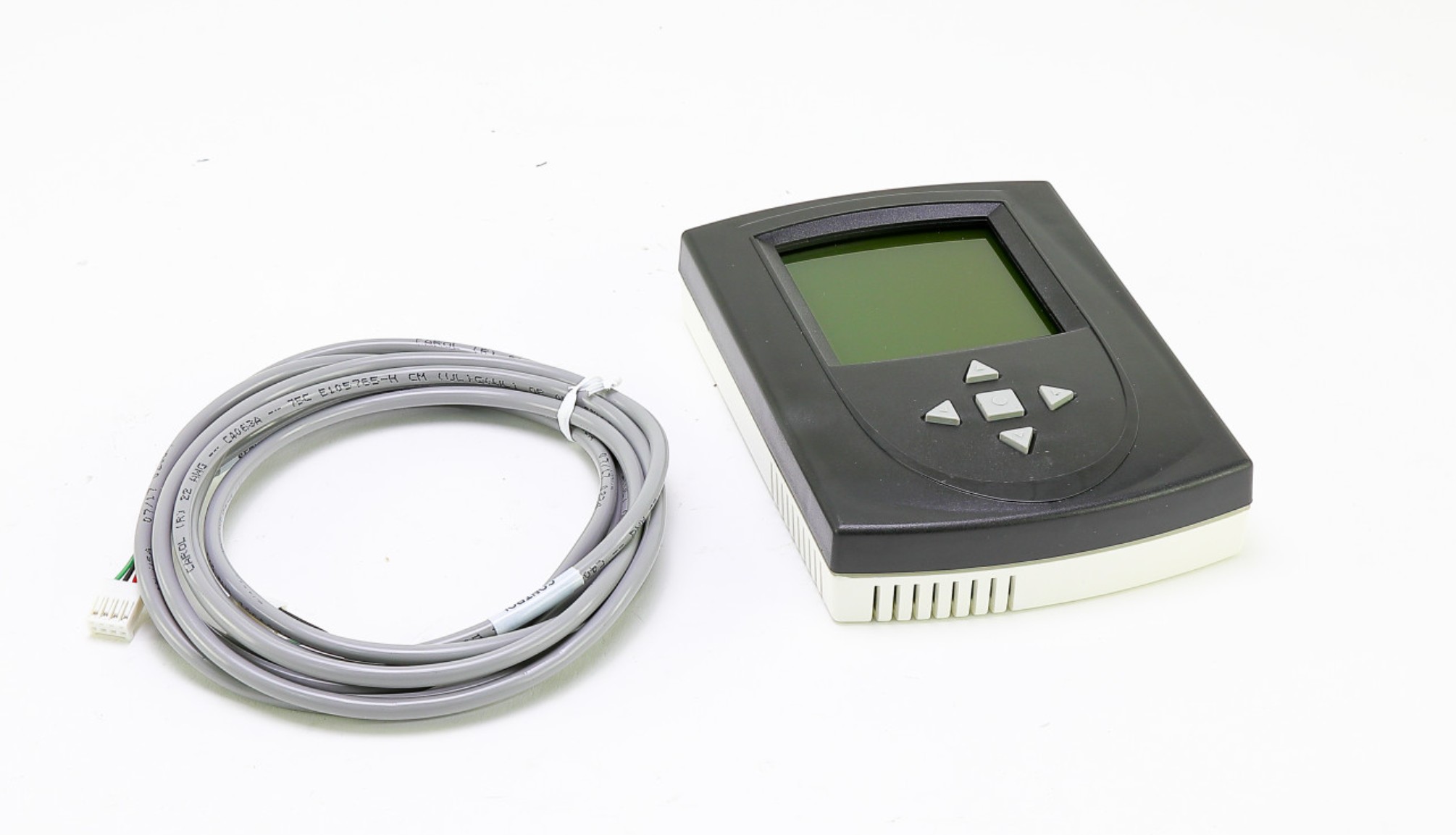
ClimateMaster ACDU03 Diagnostic Tool
Description
The ClimateMaster ACDU03 Diagnostic Tool is a necessary tool for technicians who install and service ClimateMaster Digital Communicating Units. It offers both programming and diagnostic capabilities, doing away with the requirement for a digital communication thermostat. To customize the unit for a given set of requirements, technicians can electronically change variables, including airflow, heat pump options, and pump operation. The ACDU03 also facilitates troubleshooting by providing control diagnostics, allowing manual unit operation, and displaying fault history along with operational conditions. ClimateMaster's Tranquility TE and TZ series geothermal heating and cooling systems are compatible with this tool because it connect straight to the DXM2 board via a 4-wire connector. For HVAC specialists using ClimateMaster equipment, the ACDU03 simplifies troubleshooting, simplifies configuration, and saves critical time.
Dimensions:
- Weight: 6 lbs
ClimateMaster Communicating Service Tool ACDU03
ACDU03 ClimateMaster Communicating Service Tool is a communication service tool for ClimateMaster water source heat pump systems. It allows technicians to electronically configure and diagnose the system without installing a digital communication thermostat.ClimateMaster Communicating Service Tool Electronically adjust airflow, heat pump options and configurations, pump or modulating valve operation, unit family, unit size, and other critical settings. Operate the unit manually, perform control diagnostics, view dip switch configurations, and view fault history and operating conditions when a fault occurs.Optimize system settings for maximum efficiency and comfort. Provide technicians with an easy-to-use tool for configuring and diagnosing ClimateMaster water source heat pump systems.
Key Features:
- User-friendly interface: Simple controls and a clear display for easy operation.
- Communicates with the system: Connects to the DXM2 board via a 4-wire connector for real-time data access and control.
- Portable and lightweight: Easy to carry and use in different locations.
- Durable construction: Built to withstand the demands of everyday use.
- Wide range of compatibility: Works with various ClimateMaster water source heat pump models.
Dimensions of the ACDU03 ClimateMaster Communicating Service Tool :
- Length: 8 inches (20.3 cm)
- Width: 5 inches (12.7 cm)
- Height: 1.5 inches (3.8 cm)
- Weight:1.82lbs/825.54g
Signs of a Faulty ClimateMaster Communicating Service Tool ACDU03
While the ACDU03 ClimateMaster Communicating Service Tool is a durable and reliable tool, it may eventually malfunction or become damaged. Here are some signs that indicate a potential problem with the ACDU03:
Display issues:
- Blank or distorted display
- Unresponsive buttons
- Dim or flickering backlight
Communication problems:
- Unable to communicate with the DXM2 board
- Error messages related to communication
- Intermittent connection
Functionality issues:
- Unable to configure system settings
- Unable to diagnose system issues
- Inaccurate readings or data
- Unexpected or erratic behavior
Physical damage:
- Cracks or damage to the casing
- Loose or broken connectors
- Signs of water damage or corrosion
Choose the best HVAC equipment parts and supplies from PartsHnC!
-
Same Day Shipping
-
Best Quality And Best Price
-
Wide Range of Inventory
-
Best Customer Service
Have More Questions or Need Help to Place The Order?
Reach us at (866)773-0907 or contact@partshnc.com
FAQs
Q: How do I know if the ClimateMaster Communicating Service Tool ACDU03 is compatible with my system?
A: Refer to the ClimateMaster website or contact an authorized dealer for compatibility information.
Q: Can I use the ClimateMaster Communicating Service Tool as a homeowner?
A: While possible, it is not recommended. The ACDU03 requires specialized knowledge and training to operate and interpret its readings.
Q: What should I do if I suspect my ACDU03 ClimateMaster Communicating Service Tool is faulty?
A: Check the batteries, connectors, and firmware. If the issue persists, contact ClimateMaster customer support or an authorized dealer for assistance.
Step1: Turn off power to the HVAC system before connecting any diagnostic equipment.
Step2: Locate the controller or communication port on the unit and align the diagnostic tool connector.
Step3: Plug the Diagnostic Tool firmly into the designated port.
Step4: Secure any latches or retention clips to prevent accidental disconnection.
Step5: Restore power, launch the diagnostic interface, and verify communication with the system.
Customer Reviews
Write a Review
-
Temperature Diagnostics
Reads system parameters accurately for proper diagnostics.
-
Easy to Connect
Easy to connect and use with clear error codes.
-
Efficient
Accurate diagnostics, saves time, highly reliable tool
-
Versatile
Revolutionary device for precise system analysis
-
Excellent accuracy
This diagnostic tool offers real-time system analysis, improving troubleshooting accuracy.
We strive to provide our customers with a hassle-free and efficient shopping experience. Our shipping policy ensures the timely delivery of your orders and complete customer satisfaction. View More
We are committed to ensuring your complete satisfaction with every purchase. We understand that circumstances may arise where you must return a product or request a refund. If for any reason you are not satisfied, you may return the item(s) according to the terms outlined below. View More
This Payment Policy outlines the terms and conditions governing all payments made for products purchased through our website. By making a purchase, you agree to be bound by this Payment Policy. View More