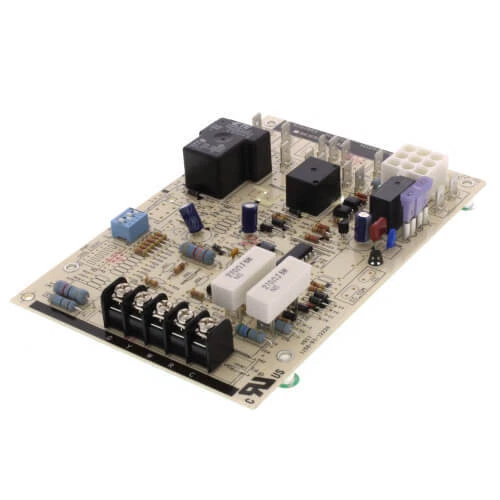
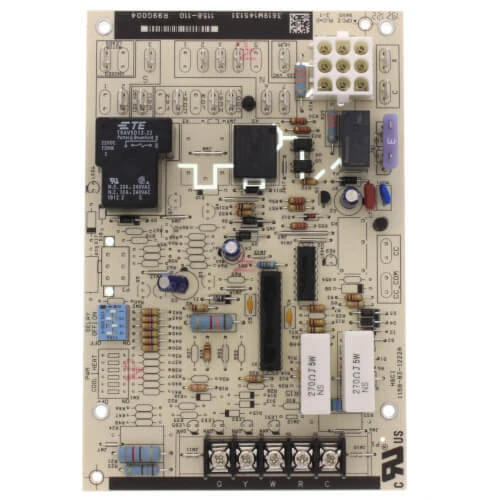
International Comfort Products R99G004 Fan Timer Control Board
Specifications:
| Attribute | Details |
|---|---|
| Type | Control Fan Timer Board |
Description
Dimensions:
- Weight: 2 lbs
Step 1: Turn off main power to HVAC unit and verify zero voltage.
Step 2: Remove access panel and note existing wiring connections for reference.
Step 3: Disconnect harness plugs gently without pulling wires.
Step 4: Mount new board onto brackets and secure screws.
Step 5: Reconnect wires matching labels exactly to terminals.
Step 6: Restore power and run system test to confirm proper fan and timing operation.
-
What maintenance is required for the International Comfort Products R99G004 Fan Timer Control Board?
Inspect the control board periodically for dust, corrosion, or loose connections. Keep the area clean and dry to prevent electrical issues. Check wiring for secure attachment and signs of wear. Always disconnect power before performing any inspection or maintenance tasks.
-
What are common issues with the International Comfort Products R99G004 Fan Timer Control Board?
- Fan running continuously or not shutting off.
- Delayed or inconsistent fan timing cycles.
- Failure to receive or send control signals.
- Burnt traces or component damage on the board.
Customer Reviews
No reviews yet. Be the first to write one!
Write a Review
We strive to provide our customers with a hassle-free and efficient shopping experience. Our shipping policy ensures the timely delivery of your orders and complete customer satisfaction. View More
We are committed to ensuring your complete satisfaction with every purchase. We understand that circumstances may arise where you must return a product or request a refund. If for any reason you are not satisfied, you may return the item(s) according to the terms outlined below. View More
This Payment Policy outlines the terms and conditions governing all payments made for products purchased through our website. By making a purchase, you agree to be bound by this Payment Policy. View More